Buying an RTX 5090 to run it as an eGPU is like buying a Ferrari and only driving it through a school zone. The raw silicon power of Nvidia’s Blackwell flagship is undeniable, but the moment you move that card outside a dedicated PCIe 5.0 x16 slot on a motherboard, you’re paying a massive “latency tax” that no amount of marketing can fix. Recent benchmarks show CopprLink finally dethroning OCuLink in the external GPU hierarchy, yet the victory feels hollow when you realize you’re still losing nearly 20% of the card’s potential to the cable itself.
I’ve set up hundreds of eGPU configurations since the early days of Thunderbolt 3, and the CopprLink interface is the first time I haven’t felt like I was completely strangling the hardware. But let’s be clear: this isn’t a “plug-and-play” miracle for casual laptop users. The setup involves stiff, specialized cables and enclosures that cost as much as a mid-range gaming PC on their own. We’re finally seeing the bandwidth numbers we’ve wanted for years, but the logistical hurdles haven’t shrunk an inch.
CopprLink provides the PCIe 5.0 bandwidth necessary to finally make an external RTX 5090 viable for AI and rendering. However, the extreme cost and cable rigidity mean it remains a niche tool for professionals, rather than a sensible upgrade for most gamers.
What the Spec Sheet Doesn’t Tell You
Nvidia’s RTX 5090 is built on a 512-bit memory bus, which is a monstrous pipeline for data. When you use a CopprLink connection, you’re tapping into a PCIe 5.0 x4 link, which theoretically offers 16GB/s of bandwidth—double what the previous OCuLink standard could manage. This looks great on a bar chart. What the spec sheet ignores is the signal degradation that occurs over that external cable. Unlike internal traces on a motherboard that are measured in millimeters, a one-meter CopprLink cable introduces timing variances that can cause micro-stuttering in high-frame-rate scenarios.
The Blackwell architecture is also more sensitive to host-to-device latency than the older Ada Lovelace cards. While CopprLink reduces the bottleneck, the protocol overhead of the enclosure’s controller still adds a few milliseconds to every frame request. For local AI inference, where you’re loading massive weights into the 32GB of VRAM, this doesn’t matter much. But if you’re trying to push 4K at 240Hz in a competitive shooter, that slight delay makes the 5090 feel more like a 5080.
CopprLink bypasses the OS-level polling delays inherent in USB4 and Thunderbolt, providing a “near-native” PCIe connection that dramatically improves 1% low frame rates compared to OCuLink.
At a Glance: The Numbers
Performance Reality Check
If you use this for deep learning or training local LLMs, you won’t care about the port speed much after the initial model load. Once the weights are in that 32GB pool of GDDR7 memory, the computation happens on the card itself, bypassing the cable. In these scenarios, the RTX 5090 eGPU is a monster. It allows a thin laptop to perform tasks that would normally require a server rack. But for gaming, the “triumph” over OCuLink is purely relative. You’re moving from a 30% performance loss to a 15% loss. It’s better, but it isn’t perfect.
The real-world scenario that justifies this hardware is a specialized workstation. If you’re running a massive Stable Diffusion batch or a Redshift render while your laptop’s internal GPU handles the UI, the 5090 eGPU over CopprLink is a revelation. It handles the throughput without the system-wide lag that usually plagues Thunderbolt-based setups. The cable is the key; CopprLink uses a direct PCIe extension protocol that feels much more stable than the tunneled packets of USB4.
Strengths and Weaknesses
👍 What We Like
- PCIe 5.0 x4 bandwidth finally matches modern GPU needs
- 32GB GDDR7 is a dream for local AI and LLM training
- Direct PCIe connection reduces micro-stutter in gaming
- Superior stability over OCuLink for multi-day rendering tasks
👎 What Could Be Better
- CopprLink cables are stiff, thick, and difficult to route
- Enclosures for a 600W card are massive and loud
- Setup requires specialized host-side adapters
- Total cost of enclosure + card is astronomical
The cable is a nightmare. To maintain the signal integrity required for PCIe 5.0, the CopprLink lead is thick and has a very limited bend radius. If you have a small desk, trying to position the enclosure without putting stress on the laptop’s port is a genuine struggle. It feels like industrial equipment, not a consumer peripheral.
The Right Buyer vs. The Wrong Buyer
✅ Buy This If…
- You need 32GB of VRAM for AI development on a laptop
- You do heavy 3D rendering and need to offload the work
- Your laptop has a native CopprLink or PCIe 5.0 M.2 slot
❌ Skip This If…
- You are primarily a gamer looking for a simple upgrade
- You want a portable solution for traveling
- You are on a budget—this setup costs more than many cars
There is an edge case that most reviews miss: the “one-cable workstation” dream. If you have a high-end Mini PC with a CopprLink port, this eGPU setup allows you to have a tiny computer for daily tasks and a world-class workstation for the evening. It’s a very specific lifestyle choice that only makes sense if you refuse to own a tower PC.
The Alternatives Worth Considering
When we look at the alternatives, we have to decide if the bandwidth jump is worth the friction. OCuLink is cheaper and more established, but it’s fundamentally a generation behind. Thunderbolt 5 is more convenient, but it still uses a tunneled protocol that adds more latency than a direct CopprLink connection.
| Model | Price | VRAM | TFLOPS | TDP | Best For |
|---|---|---|---|---|---|
| RTX 5090 (CopprLink) ★ Our Pick | $1,999+ | 32GB | ~100 | 600W | AI & Pro Rendering |
| RTX 5080 (OCuLink) | $1,199 | 16GB | ~70 | 400W | High-End Gaming |

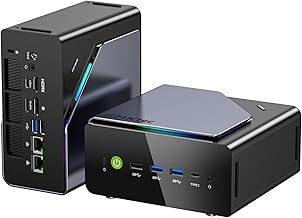
GMKtec K12 Gaming Mini PC Oculink AMD Ryzen 7 H 255 (Upgraded 8745HS) 32GB DDR5 RAM 512GB SSD, Desktop Computer Radeon 780M Graphics, 3X M.2 2280 Storage Expansion, Dual NIC 2.5G, HDMI 2.1, USB4
★ 4/5
$689.99
As an Amazon Associate, AiGigabit earns from qualifying purchases.
Price vs. Reality
Is the price justified? The card itself will likely retail for $1,999, and a proper CopprLink enclosure with a 750W or 850W power supply will add another $400 to $600. You’re looking at a $2,500 investment just to get external graphics. For that money, you could literally build a complete desktop with an RTX 5080. You are paying a massive premium for the ability to keep your work on a single laptop.
The reality is that this is a professional tool. If you’re a freelancer whose time is worth $100 an hour, saving 15 minutes on every render adds up fast. But for everyone else, the price-to-performance ratio is completely broken. You’re paying for the convenience of a cable, but the “convenience” of a thick, rigid CopprLink cable is debatable at best.
Should You Buy It?
The RTX 5090 eGPU over CopprLink is the pinnacle of external graphics in 2026. It finally provides the bandwidth that high-end silicon needs to breathe. If you are an AI researcher or a high-end 3D artist who needs to be mobile, there is simply no better way to get this much compute power into a laptop-based workflow. It’s stable, fast, and represents the best that current technology can offer.
But for the average user, this is a beautiful mistake. It’s too expensive, too loud, and the cables are too annoying for daily use. Most people would be far better served by a native RTX 5070 laptop or a dedicated desktop. CopprLink has triumphed over OCuLink, but it hasn’t yet triumphed over common sense for the general consumer.
See our Best GPUs for AI 2026 roundup — updated monthly with the top picks and deals.
Frequently Asked Questions
What makes CopprLink better than OCuLink?
CopprLink utilizes PCIe 5.0 specifications, which offers double the bandwidth of OCuLink’s PCIe 4.0 limit. This is crucial for high-end cards like the RTX 5090 that can actually saturate the older connection.
Can I use a CopprLink eGPU with any laptop?
No. Your laptop must have a native CopprLink port or an accessible M.2 PCIe 5.0 slot that can be adapted. Most standard laptops with only USB-C or Thunderbolt will not work with this specific setup.
How much performance is lost using an eGPU?
With CopprLink, the loss is roughly 10-15% compared to an internal motherboard slot. This is a significant improvement over the 20-30% loss typically seen with Thunderbolt or older OCuLink setups.
Is the RTX 5090 too big for standard enclosures?
Yes. Most older eGPU enclosures were designed for much smaller cards. To run a 5090, you will need a modern “large-format” enclosure with a power supply capable of at least 750W.
Does the CopprLink cable support power delivery?
No. CopprLink is a pure data connection. You will still need to plug your laptop into its own power adapter, and the eGPU enclosure will have its own dedicated power cord.
Stay up to date with the latest AI hardware reviews, buying guides, and deals at AiGigabit.com. Bookmark us for daily updates.
REVIEWED BY

Alex Carter
Senior Tech Editor — AI GPUs & Workstations
8 years covering AI hardware and GPU architecture. Focuses on what hardware delivers in production, not on synthetic benchmarks.
Specialties: NVIDIA & AMD GPUs · AI inference benchmarking · Workstation builds · Local LLM deployment