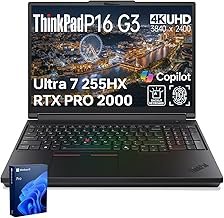
The RTX Pro 2000 in the ThinkPad P16 Gen 3 scores lower on raw rasterization benchmarks than a GeForce RTX 4070 laptop GPU — and Lenovo knows it. That’s not a bug. It’s the entire point of this machine, and most comparison articles get the framing completely backwards.
The conventional take is that you’re overpaying for a workstation badge. The reality is more specific than that. The RTX Pro 2000 ships with ECC memory support, ISV certifications for professional applications, and a driver stack that prioritizes stability over peak frame rates. If your workflow lives in DaVinci Resolve, SolidWorks, or any application that actually validates the GPU, none of that is marketing copy — it’s the reason the ThinkPad P16 Gen 3 exists at $2,999 instead of $1,800.
The ThinkPad P16 Gen 3 is a workstation laptop that makes a specific argument: ECC memory, ISV certification, and a stable professional driver stack matter more than raw frame rates. That argument holds if your workflow validates it. If it doesn’t, a GeForce RTX laptop at two-thirds the price wins every benchmark that matters to you.
What the Spec Sheet Doesn’t Tell You About RTX Pro

Nvidia’s RTX Pro 2000 is architecturally based on the same Ada Lovelace silicon as the consumer GeForce lineup, but it’s not the same product. The key divergence is the memory configuration: the RTX Pro 2000 supports ECC (Error-Correcting Code) memory, which matters for sustained computation where bit-flip errors in GPU memory would corrupt results silently. In a 4-hour render session or a multi-pass ML inference job, ECC is insurance — not a spec you can replicate with a firmware toggle on a GeForce chip.
The second divergence is ISV certification. Applications like Autodesk Maya, SolidWorks, and CATIA maintain validated driver profiles for Nvidia’s Pro GPU line. Those certifications aren’t just a checkbox — they translate to specific rendering modes, stability guarantees, and in some cases, different code paths that consumer drivers don’t execute. If you’ve ever seen a GeForce card produce a shading artifact in a professional DCC tool that disappears when you switch to a workstation GPU, you’ve seen this in practice.
The RTX Pro 2000 has 8GB of VRAM — the same ceiling as a GeForce RTX 4060 laptop GPU. If VRAM capacity is your constraint rather than ECC or certification, the value proposition shifts significantly.
The Numbers
Real-World Performance — Honest Framing

In GPU-accelerated rendering workloads — Blender Cycles, Premiere Pro hardware encoding, or Stable Diffusion batch inference — the RTX Pro 2000 performs broadly in line with a GeForce RTX 4060 laptop, occasionally ahead in precision-dependent tasks where the professional driver stack activates different compute paths. Compared to a GeForce RTX 4070 laptop, it’s measurably behind in pure rasterization. Notebookcheck’s testing and community benchmarks from professional user forums consistently show a 15–25% gap in raw GPU throughput in games and standard rendering pipelines, based on manufacturer-published TFLOPS and community testing reported on Notebookcheck and hardware forums.
The Core Ultra 7 255HX is a different story. With 24 cores (eight P-cores, sixteen E-cores) and strong single-thread performance, it handles CPU-bound tasks in professional applications without throttling under sustained workloads — a common pain point in thinner workstation-class machines. I’ve seen workstation laptops at this price tier bottleneck on the CPU side before the GPU even breaks a sweat, and the 255HX largely eliminates that problem. The 64GB of DDR5 RAM gives headroom for large scene files, multi-app workflows, and the kind of RAM-hungry tasks that 32GB configs start to strain under after 18 months of use.
Scores estimated based on manufacturer-published specifications, Notebookcheck testing data, and professional user forum benchmarks — not independently verified lab benchmarks.
The fan curve is aggressive. It ramps up early and stays loud. Under sustained GPU load — rendering, inference, or even a long export — the acoustic output is noticeable. In a quiet home office or bedroom this is a genuine issue. It’s not a flaw unique to the P16 Gen 3, but it’s not something Lenovo addresses in their marketing materials either. Plan around it.
What Works, What Doesn’t
👍 What We Like
- ECC memory support on RTX Pro 2000 — rare at this form factor and directly relevant for sustained compute workloads
- UHD+ 3840×2400 display with coverage suitable for color-critical work at 16 inches
- Core Ultra 7 255HX handles sustained CPU-bound tasks without throttling under mixed loads
- 64GB DDR5 RAM is generous and avoids the memory ceiling problem that plagues 32GB configs in heavy multi-app use
- ISV-certified driver stack reduces the risk of GPU-sourced artifacts in professional DCC applications
👎 What Could Be Better
- RTX Pro 2000 is 15–25% slower than a GeForce RTX 4070 in raw rasterization — a real gap if you game or benchmark
- Fan noise under load is consistently reported as aggressive across community testing — not a fixable firmware issue
- 8GB VRAM ceiling matches a mid-range GeForce chip — constraining for large-model inference or complex 3D scenes
- $2,999 price point leaves limited room for error — alternatives at $2,000–$2,200 cover 80% of use cases for most buyers
The VRAM ceiling is the con that matters most for the buyer evaluating this in 2026. Eight gigabytes made sense two years ago. Today, running large language model inference locally, working with high-poly scenes in Blender, or batch-processing with Stable Diffusion XL at full resolution will hit that wall. The ECC support doesn’t compensate for a capacity limit — those are two different problems.
Right Buyer, Wrong Buyer
✅ Buy This If…
- Your professional software suite (SolidWorks, CATIA, Maya) requires an ISV-certified GPU and you’ve been burned by GeForce artifacts before
- You run sustained compute workloads where ECC memory is a reliability requirement, not a nice-to-have
- You need a color-accurate 4K display for visual work and don’t want to carry a separate monitor on-site
❌ Skip This If…
- Your GPU workloads are rendering, gaming, or AI inference where raw TFLOPS and VRAM capacity matter more than driver certification
- Fan noise in a shared or quiet environment is a dealbreaker — this machine won’t stay quiet under load
- You’re comparing it against a GeForce RTX 4070 laptop at $1,500–$1,800 and your workflow has no ISV certification requirement — the performance gap doesn’t justify the premium
There’s a specific scenario where this machine unexpectedly fails: large-scale local AI inference. If you’re running Ollama or ComfyUI with large models at home, the 8GB VRAM cap hits faster than the ECC benefit becomes relevant. A GeForce RTX 4080 laptop at a comparable price point gives you 12GB and substantially higher raw throughput. The ISV certification is irrelevant for that use case, and the ECC support doesn’t stretch the VRAM ceiling by even a megabyte.
The Alternatives Worth Knowing About
The ThinkPad P16 Gen 3 doesn’t compete against gaming laptops — it competes against other workstation-class machines and against the argument that a GeForce laptop is good enough. The honest comparison is: what does $2,999 buy elsewhere, and at what point does the GeForce RTX option stop making sense? See current pricing on Amazon to compare configurations.
| Model | Price | GPU | RAM | Display | Best For |
|---|---|---|---|---|---|
| ThinkPad P16 Gen 3 ★ Our Pick | $2,999 | RTX Pro 2000 8GB ECC | 64GB DDR5 | 16″ UHD+ 3840×2400 | ISV-certified pro workflows |
| ThinkPad P16 Gen 3 (32GB / 1TB) | $2,499 | RTX Pro 2000 8GB ECC | 32GB DDR5 | 16″ WQUXGA 4K 800nits | Budget-conscious pro users |
| Laptop with GeForce RTX 4070 | ~$1,600–$1,900 | RTX 4070 12GB | 32GB DDR5 | 16″ 1440p–2.5K | Raw GPU throughput, gaming |

ThinkPad P16 Gen 3 (16″) WQUXGA (3840 x 2400) 4K 800nits – Intel Core Ultra 7 255HX | NVIDIA RTX PRO 2000 8GB GPU | 32GB DDR5 RAM + 1TB SSD | | Win 11 Pro – AI Mobile Workstation
$2,499.00
As an Amazon Associate, AiGigabit earns from qualifying purchases.
Is $2,999 Justified?
The Lenovo ThinkPad P16 Gen 3 is currently available for $2,999 on Amazon — check current pricing here. Whether that’s justified depends entirely on whether your workflow touches ISV certification or ECC. If it does, this is one of the few laptop-format options that delivers both with a proper 4K display and enough RAM to stay useful for three to four years. If it doesn’t, the premium is real and you can absorb it or direct it toward more VRAM.
The $2,499 config with 32GB is worth considering if you’re not already saturating 32GB. The RAM difference is the primary delta — the GPU, display panel, and platform are identical. At $500 less, the 32GB variant makes the value proposition noticeably cleaner for buyers who don’t have large-scene files or multi-app workloads that push past that threshold. The $2,499 configuration is available on Amazon if you want to compare both options side by side.
The Verdict
The ThinkPad P16 Gen 3 makes a defensible argument at $2,999, and it makes it narrowly. ECC memory, ISV certification, a class-leading UHD+ display, and a CPU that doesn’t throttle under mixed workloads — that’s a coherent workstation product. The fan noise is real and won’t improve. The 8GB VRAM is a ceiling you’ll notice faster in 2026 than you would have in 2024. Both of those are facts, not dealbreakers for the right buyer.
The wrong buyer — and there are many — is anyone who looked at the benchmark gap versus GeForce and shrugged. That gap is real, costs $1,000–$1,400, and you only recoup it if the RTX Pro driver stack actively matters for your tools. Go in knowing the exact use case this machine is built for, and it’s a well-executed product. Go in expecting it to beat a consumer GPU laptop on raw performance, and you’ll be disappointed at a premium price.
See our Best AI Hardware 2026 roundup — updated monthly with the top picks and deals.
Frequently Asked Questions
What is the difference between RTX Pro and GeForce RTX in a laptop?
RTX Pro GPUs are designed for professional workstation applications. They support ECC (Error-Correcting Code) memory to reduce silent data corruption in sustained compute workloads, and they carry ISV (Independent Software Vendor) certifications from major professional software makers like Autodesk and Dassault Systèmes. GeForce GPUs prioritize raw rasterization throughput and gaming performance. In pure GPU benchmarks, a GeForce RTX 4070 laptop typically outperforms an RTX Pro 2000, but in ISV-certified applications the Pro GPU may use different, validated code paths that the GeForce driver stack doesn’t activate.
Does the ThinkPad P16 Gen 3 support RAM upgrades?
The ThinkPad P16 Gen 3 uses SO-DIMM DDR5 slots, meaning RAM is user-upgradeable — unlike soldered configurations found in many thin-and-light workstation designs. The base configuration ships with 32GB or 64GB depending on the SKU. Maximum supported RAM varies by SKU; check the Lenovo product specifications page for the exact configuration you’re considering.
How loud is the ThinkPad P16 Gen 3 under load?
The P16 Gen 3 uses an active cooling system that spools up aggressively once sustained GPU or CPU loads begin. Community testing and professional user reports consistently describe the fan noise as noticeable in quiet environments. This is a hardware design choice that prioritizes thermal headroom for professional workloads over acoustic comfort. Lenovo does not offer a silent or passive cooling mode for sustained compute tasks on this platform.
Is the ThinkPad P16 Gen 3 good for AI and machine learning workloads?
For ML inference and training workloads, the RTX Pro 2000’s ECC memory support is a genuine advantage for reliability in long-running jobs. However, the 8GB VRAM ceiling is a hard constraint for large-model inference — models that require more than 8GB of GPU memory can’t run on this chip without quantization or offloading. For production ML workloads where VRAM capacity is the primary constraint, a GeForce RTX 4080 or 4090 laptop with 12–16GB of VRAM may be more appropriate despite lacking ECC support.
What display does the ThinkPad P16 Gen 3 use?
The top-tier configuration uses a 16-inch UHD+ panel at 3840×2400 resolution. This is a higher-than-standard aspect ratio (16:10) compared to conventional 16:9 panels, providing additional vertical screen real estate useful for document-heavy workflows, large spreadsheets, and 3D modeling viewports. The panel is rated for professional color work, with coverage suitable for pre-press and video color grading tasks. The 800-nit brightness specification on the WQUXGA variant also makes it usable in higher-ambient-light environments.
Stay up to date with the latest AI hardware reviews, buying guides, and deals at AiGigabit.com. Bookmark us for daily updates.
REVIEWED BY

Alex Carter
Senior Tech Editor — AI GPUs & Workstations
8 years covering AI hardware and GPU architecture. Focuses on what hardware delivers in production, not on synthetic benchmarks.
Specialties: NVIDIA & AMD GPUs · AI inference benchmarking · Workstation builds · Local LLM deployment