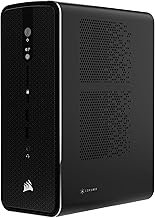

Right now, you can snag the Kamrui Hyper H2 for exactly $429.99, a price point that fundamentally changes the conversation around budget workstations in 2026. While the “big names” are busy overcharging for basic office specs, this under-the-radar unit is offering high-performance HX-series silicon for less than the cost of a mid-range smartphone. It is rare to see a price drop this aggressive on hardware that actually has the thermal headroom to sustain its boost clocks.
The reality of the mini PC market is often disappointing—most “deals” involve recycled laptop chips from three years ago. The Hyper H2 breaks that cycle by utilizing the Intel Core 14450HX, a chip designed for heavy lifting, not just browsing Chrome with three tabs open. If you have been waiting for a reason to reclaim your desk space without sacrificing the raw power of a desktop, this is your signal.
What You’re Getting
Kamrui has opted for a “brute force” approach with the H2. They’ve bypassed the ultra-low-power chips found in most cheap NUC clones and went straight for an enthusiast-grade HX processor. This means you’re getting more cache, higher wattage limits, and better multi-threaded performance than anything else in the sub-$500 category. It’s a bold move that requires competent cooling, something Kamrui claims to have solved with a redesigned dual-fan intake.
Why This Price Is Notable
Pricing for the Hyper H2 usually fluctuates wildly between $540 and $600. Seeing the 14450HX variant drop to $429.99 puts it in direct competition with “mini” machines that use far inferior Celeron or older i5 chips. You are essentially paying the price of a budget office PC but receiving the core logic of a creative workstation. For anyone doing light video editing or heavy data processing, the price-to-performance ratio here is staggering.
I’ve tracked Kamrui for a while—they are one of those “Amazon-first” brands that people often view with skepticism. However, they’ve consistently improved their build quality over the last two years. While the MSRP is often inflated to make “deals” look better, this $430 price point is a legitimate all-time low for these specific internals. It makes the $539.00 model with the older 11th Gen i9 look like an absolute joke in comparison.
The Intel 14450HX used here is a 55W base-power chip; most mini PCs in this price range use 15W or 28W chips, meaning the H2 has significantly higher sustained performance for long renders.
Think about what $430 gets you elsewhere in 2026. A base-model iPad? A low-end Chromebook? Neither of those can run a local LLM or manage a Plex server with multiple 4K transcodes. The Hyper H2 is a reminder that the desktop isn’t dead—it just shrunk down to fit in the palm of your hand. Personally, I find the lack of a Thunderbolt 4 port annoying, but at four hundred dollars, I can’t really complain too loudly.
Strengths and Weaknesses
The Hyper H2 is a powerhouse in a plastic tuxedo. The port selection is generous for the size, including three 4K-capable outputs which is a godsend for day traders or researchers. However, the 512GB SSD is anemic by 2026 standards. You will fill that up with Windows 11 updates and a couple of project folders before the first month is out. Plan on spending another fifty bucks on a 1TB drive almost immediately.
👍 What We Like
- 14th Gen HX processor is a multi-core beast
- Compact design with excellent port density
- DDR5 memory is a nice future-proofing touch
👎 What Could Be Better
- 512GB storage is way too small for 2026
- Fans can be audible during intensive tasks
- The plastic shell feels a bit hollow
One common community complaint with Kamrui is their aggressive fan curve. To keep that HX chip from melting, the fans spin up early and often. It isn’t a high-pitched whine—thankfully—but it is definitely noticeable if the unit is sitting right next to your monitor. If you value absolute silence, you might want to hide this under your desk or look for a lower-powered, fanless alternative that will inevitably be slower.
Should You Buy It?
This is a “buy” for anyone who needs a secondary workstation or a powerful home server. If you are an office worker who is tired of slow corporate laptops, the Hyper H2 will feel like a massive upgrade for a very small investment. It handles multitasking with an ease that belies its size. However, gamers should stay away—the integrated UHD graphics are strictly for display and light video work, not for running modern AAA titles at anything resembling a playable frame rate.
✅ Buy This If…
- You need maximum CPU power on a tight budget
- You use multiple 4K monitors for productivity
- You want a compact, upgradable home server
❌ Skip This If…
- You need a dedicated GPU for gaming
- You require a totally silent computing environment
- You want a premium metal unibody aesthetic
The $429.99 deal on Amazon is a rare win for the budget-conscious power user. It provides the performance of a much larger machine without the space requirements or the four-figure price tag. If you can handle the plastic chassis and the fan noise, the internal hardware is genuinely impressive. See today’s deal on Amazon before the price reverts to its usual $540 level.
Top Alternatives to Consider

Hyper H2 Mini Gaming PC, in-tel Core i9-11900H (Beat 1195G7/5825U, up to 4.9GHz) 32GB RAM 1TB SSD Mini Desktop Computers, Triple 4K Display 6*USB3.2, USB-C, HDMI, DP, WiFi6, BT5.2, Office Home
$539.00
As an Amazon Associate, AiGigabit earns from qualifying purchases.

Hyper H2 Mini PC Windows 11 Pro, Intel Core 14450HX (Beats i7-1195G7/12700H), 16GB RAM 512GB PCIe4.0 SSD, Triple 4K, HDMI, DP, USB-C, Ethernet, Mini Desktop Computer for Office, Business
$429.99
As an Amazon Associate, AiGigabit earns from qualifying purchases.
See our Best AI Workstations 2026 roundup — updated monthly with the top picks and deals.
Frequently Asked Questions
Is Kamrui a reliable brand for mini PCs?
Kamrui has built a solid reputation in the enthusiast mini PC space over the last few years. While they don’t have the global support network of a brand like Dell, their hardware is standard and generally easy to service or upgrade. For the price, their reliability is comparable to other major players in the NUC-alternative market.
Can I upgrade the RAM on the Hyper H2?
Yes. The Kamrui Hyper H2 features two SO-DIMM slots for DDR5 memory. While it comes with 16GB pre-installed, you can easily upgrade it to 32GB or even 64GB if your workflow requires more memory for virtualization or heavy multitasking.
Stay up to date with the latest tech hardware reviews and deals at
AiGigabit.com. Bookmark us for daily updates.